Frontmat runs your whole studio for one flat monthly price:
schedule, spot booking, memberships, payments, lead follow-up, referrals, win-backs,
milestones, every location. And your members get an app they'll actually brag about.
Up nextReformer FlowTomorrow · 9:00 AM · with Alex
Spot R3Downtownin 19 hrs
💯100 classes150 to go until 🔥
12credits8 / month · activerenews Aug 12
🗓️Upcoming classes3 booked · Desert Flow Thu›
📖History & badges🌱 ⭐ 💯 earned›
🤝Invite a friendthey get a free credit›
Home
A real member's home screen, wearing the studio's brand instead of ours.
No new-client commissionsNo add-on stackingNo contractsNo marketplace selling your members someone else's classes
See it
Under two minutes, no sales call.
The real product on Willow & Oak, the same demo studio the phone above is wearing: Home,
the roster, a member booking her reformer, the schedule on the studio's own site, Leads and
the follow-up emails, a member's timeline, the reports, and the price. Narrated, with the
words on screen.
Your studio on their home screen. Your name, your colors, your icon.
Most competitors sell this as an add-on. A branded member app runs $75 to $599 a month at
Mindbody, TeamUp, fitDEGREE, and Momence. Here it's just how the product works: members
install your studio from the browser in two taps, land on their own page, and book the front
row before someone else does.
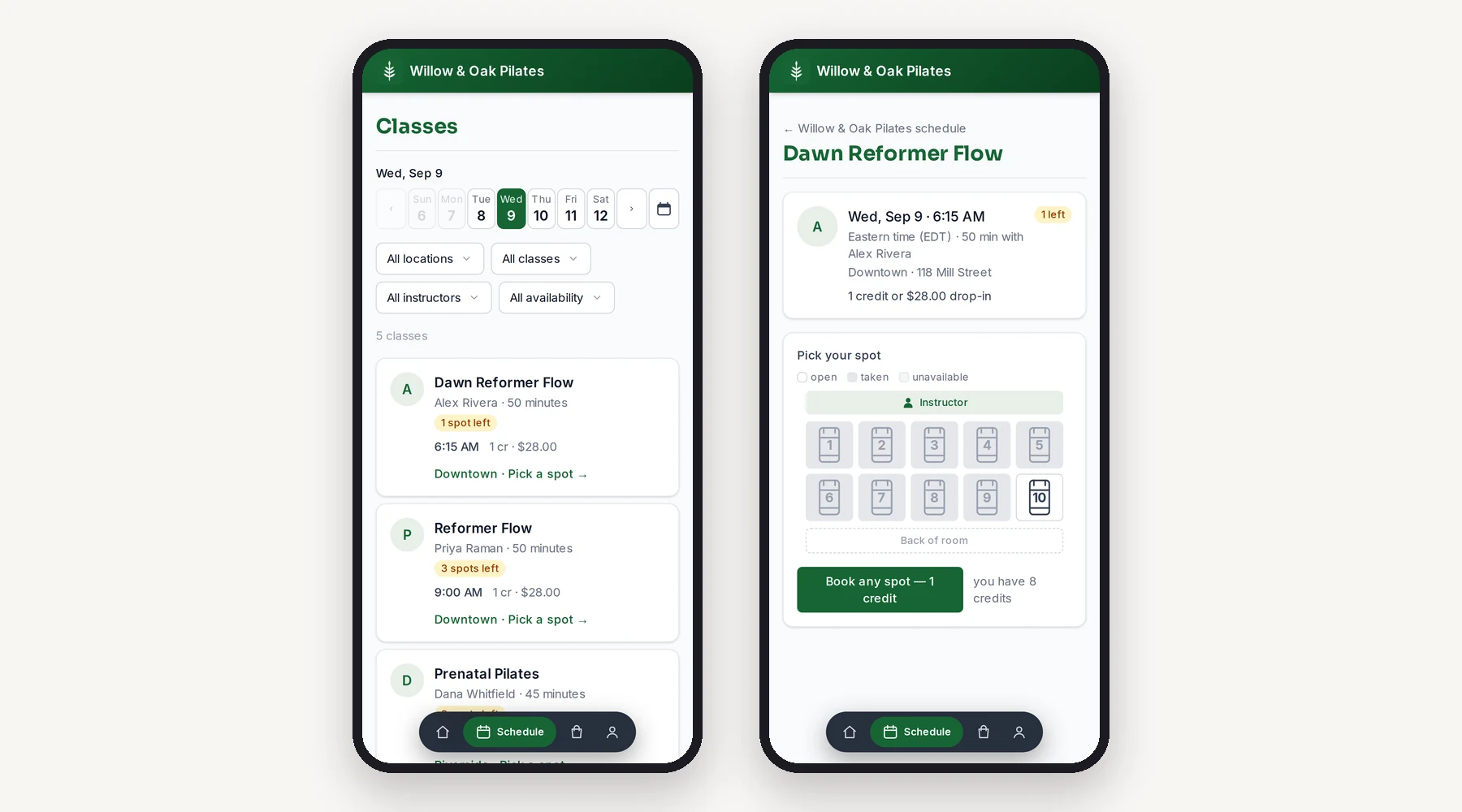
The member app, captured, not drawn: pick a day, pick a class, pick the reformer. One tap,
one credit.
Front Row
Spot booking
Members pick their exact reformer, bike, or mat from your real floor plan, then race
their friends for the front row. Their favorite spot is remembered.
Milestones
An achievement ladder they'll chase
Badges at class 10, 50, 100, 250, or whatever ladder you set. They show up in the app,
by email, and on the instructor's roster, so the 100th class gets applause in the room
and not just a push notification.
Waitlists
Claim windows that feel fair
A spot opens, the first in line gets a timed claim link. No auto-charges for classes
nobody confirmed, no quiet-hours texts at 2 a.m.
One snippet from Settings goes into Squarespace, Wix, WordPress, Shopify, Webflow or
GoDaddy, and your live schedule shows up on your page in your colors. On a current browser a
first-timer picks a class, gets a sign-in link by email, signs your waiver, picks a spot and
books without ever seeing a Frontmat page. This one is the demo studio's, embedded exactly
that way. Go on, pick a class.
Every builder
Paste it once
Squarespace, Wix, WordPress, Shopify, Webflow, GoDaddy: each gets its own three steps in
Settings, with its catch named up front. Hosts that block scripts get an iframe. Hosts
that block everything get a button.
No app required
Book where they found you
The class page, the waiver, the spot picker and the confirmation open inside your page.
The email link and the card payment come back to your page too. Members who want the
home-screen app are one tap away.
It tells you
"Live on yourstudio.com"
The moment the code is on your site, Settings says so, and counts the people who joined
and booked from there. No pixel, no tracking, nothing on your visitors.
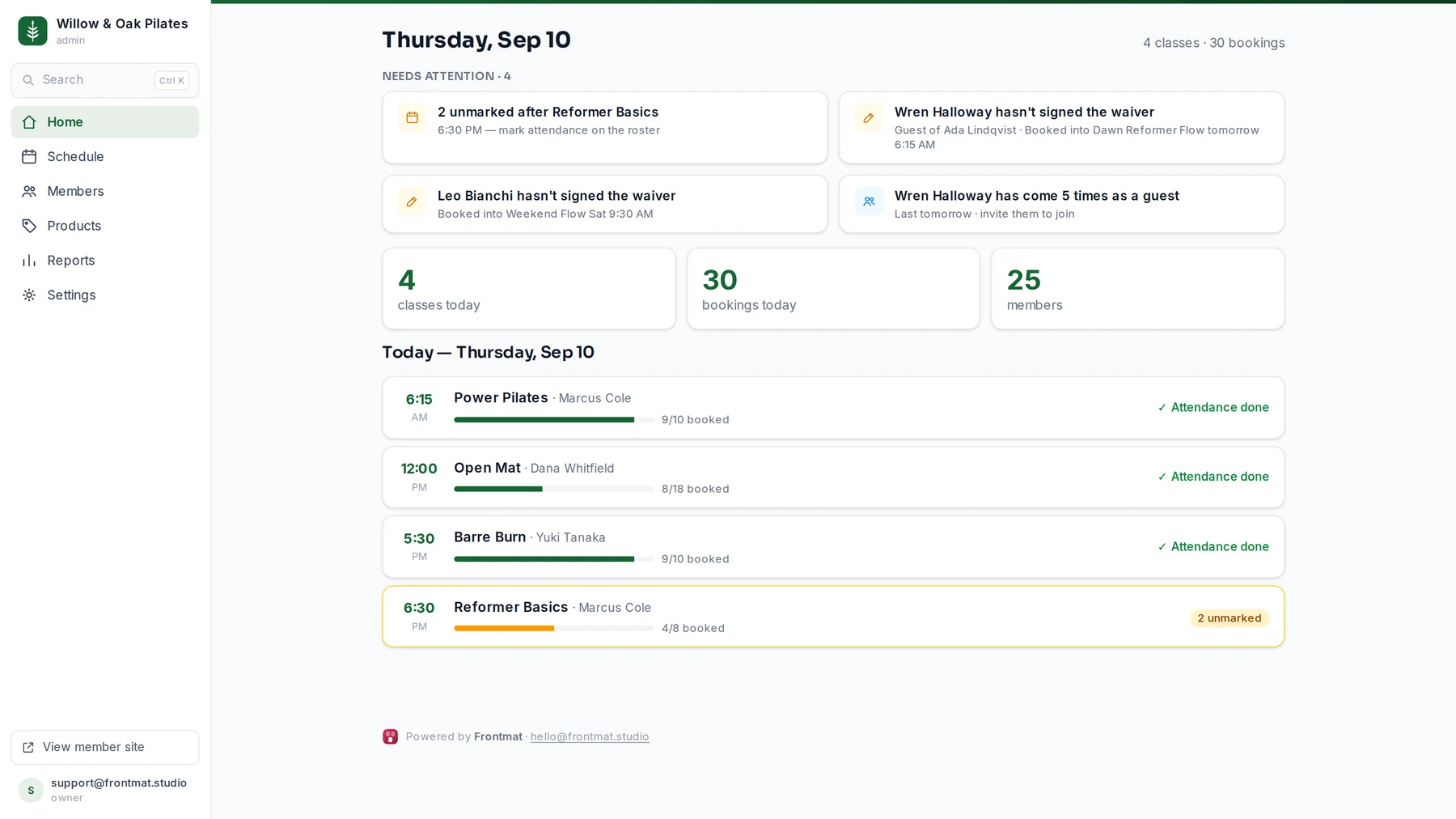
The studio side isn't a dashboard thesis. Home is the morning's list: who didn't get marked,
which payment failed, who's booked but unsigned, which regular is coming less often, who
asked about the studio this week. Each one is a tap from its fix. These are real screens
from Willow & Oak, the same demo studio the phone above is wearing, on the same build
every studio gets.
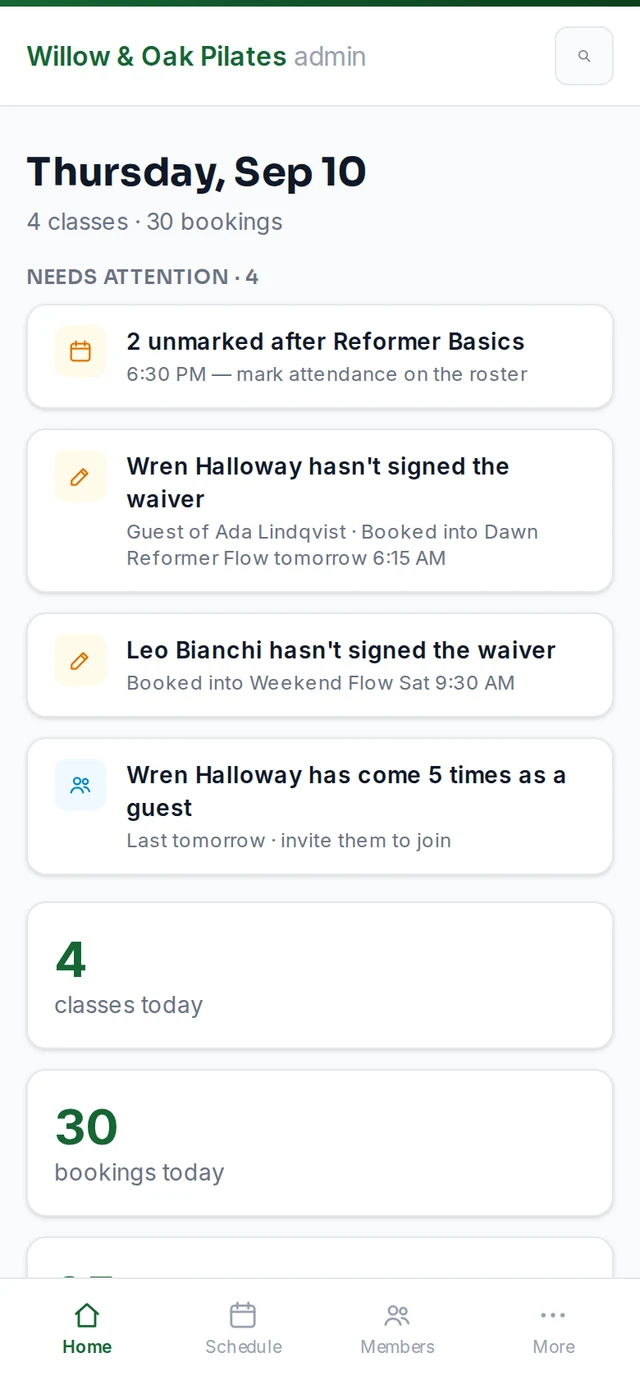
Home leads with the work: an unsigned waiver, a regular who is slipping, two who stopped
coming, this week's leads. Never just counts.
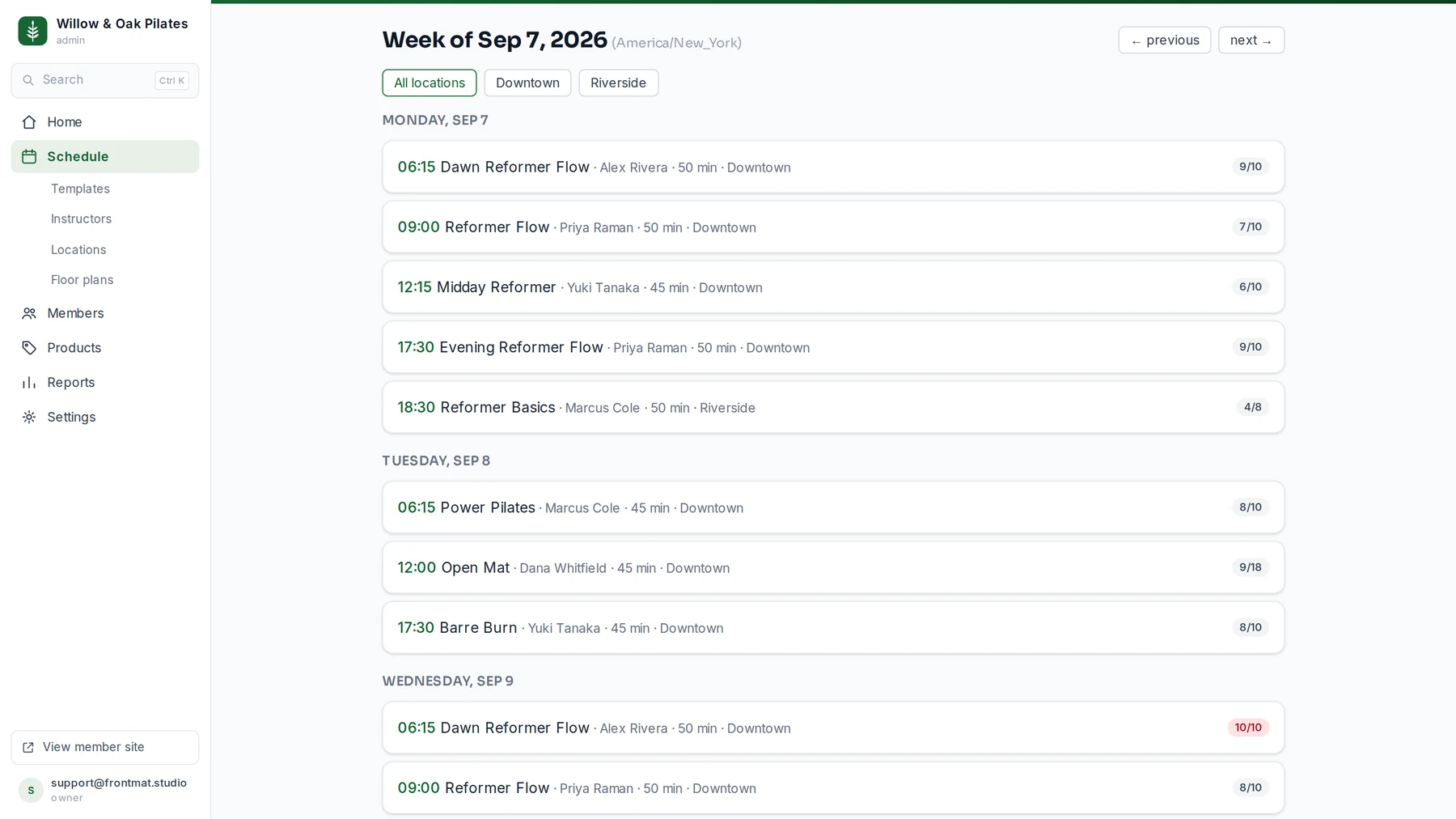
The whole week, every location, honest fill at a glance.
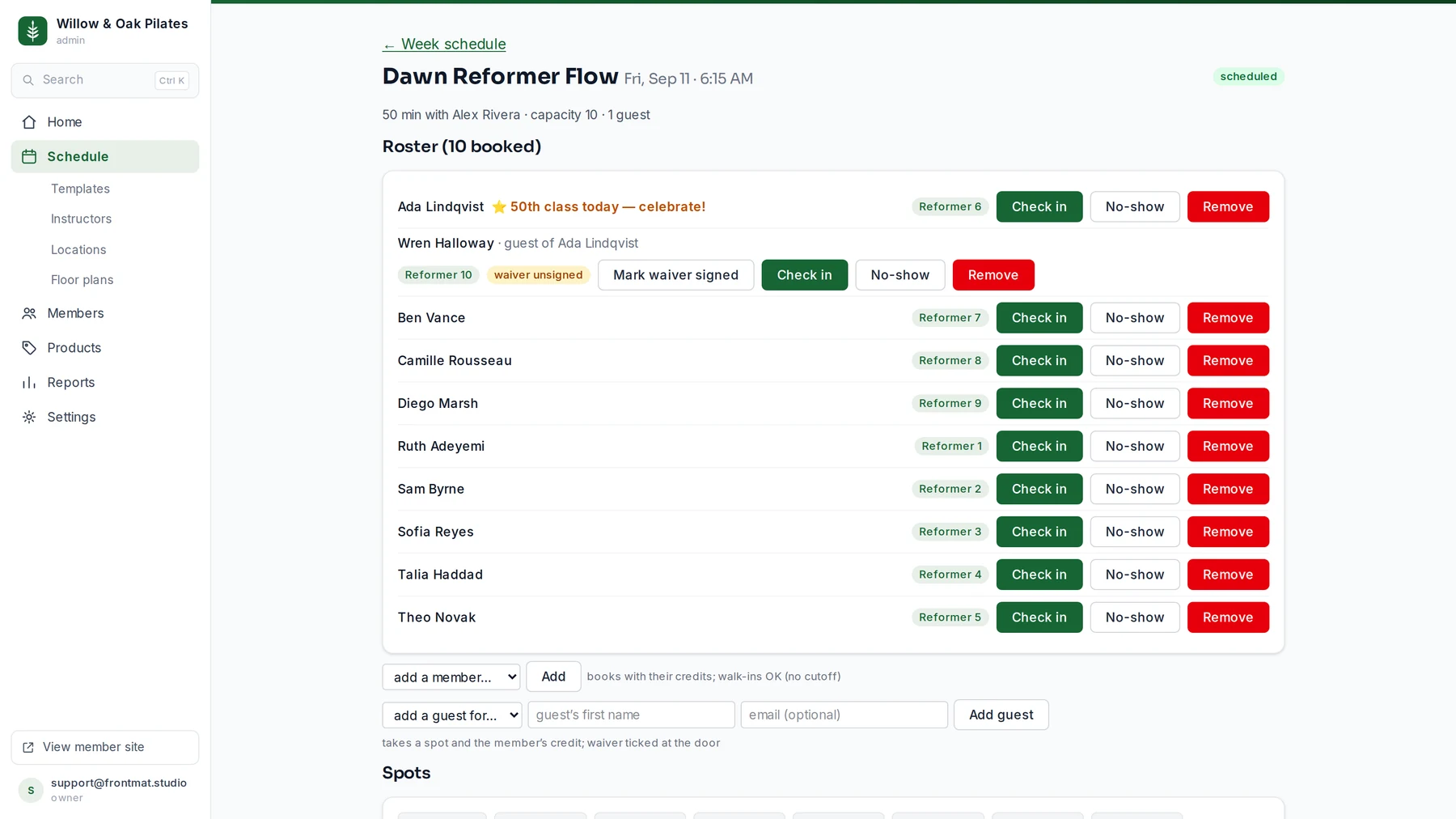
The roster is the front desk — check in, no-show, move someone to another
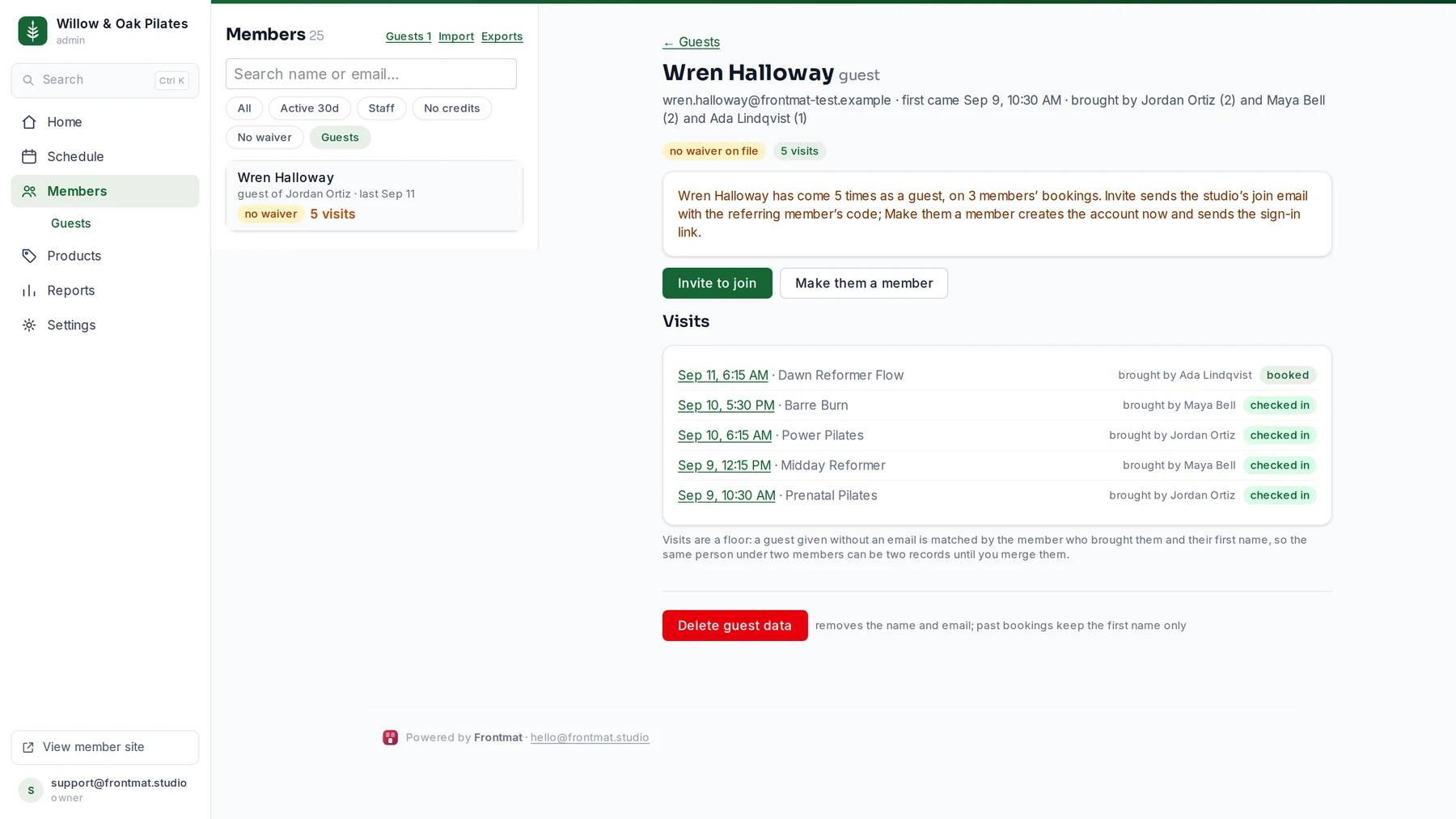
reformer, add a walk-in, and see who brought a guest.
A member can bring a friend. The friend takes a real spot, signs your waiver at the
door, and stays on a list you can invite from weeks later.
Everyone who asked about the studio, in one list: where they came from and how far they
got. Frontmat follows up for you, three short emails over ten days in your words, and
stops the moment they book.
One timeline per person. When a regular starts coming less often, the week it changed is
marked in words and a note is ready to send.
Leads and follow-up, in about a minute: everyone who asks lands in one list, three emails
go out in your words, the moment they book they are a member, and Reports follows them to
day 90.
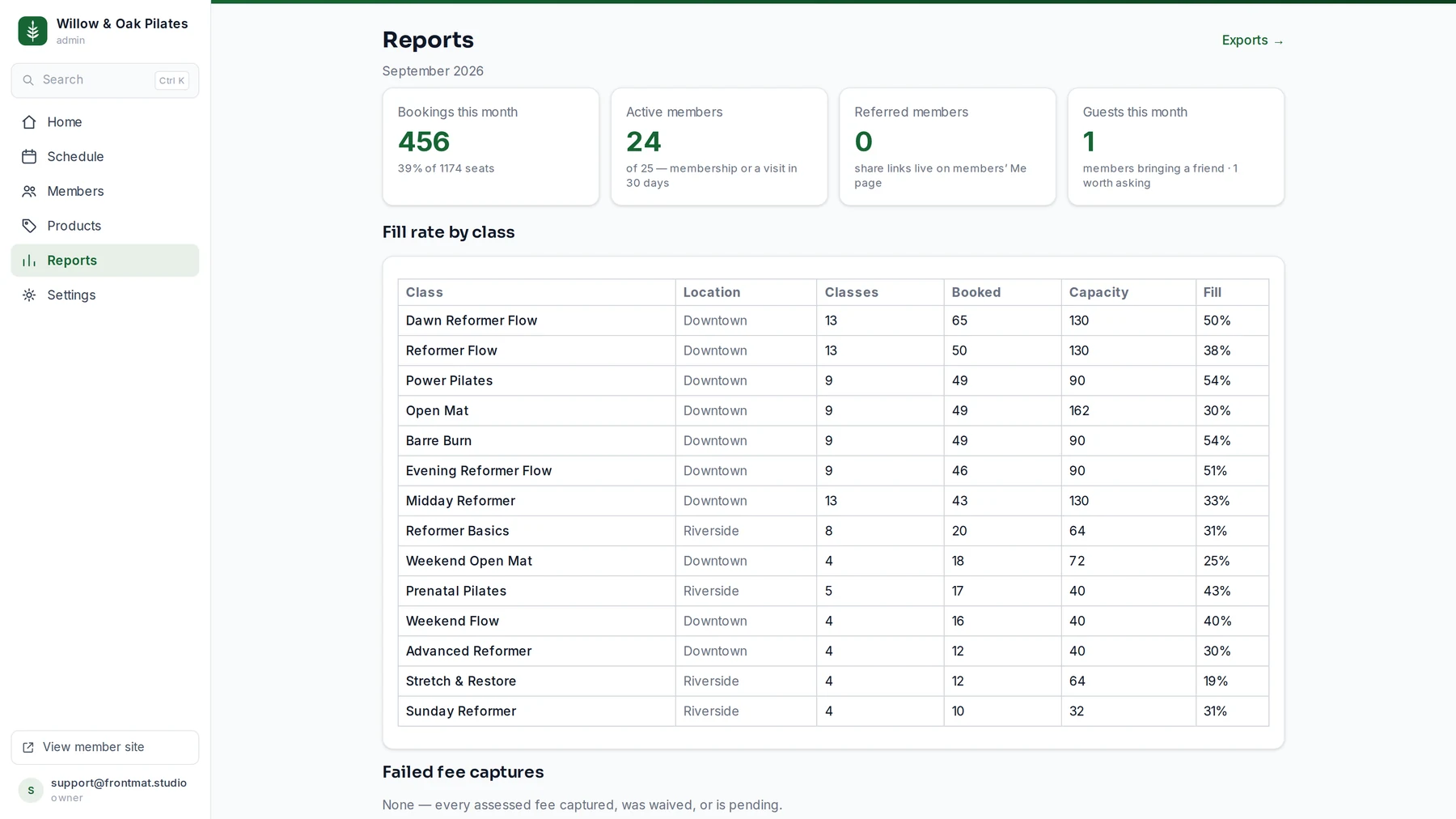
From first interest to still coming at 90 days, one group followed step by step. Below
it, fill rate by class: which classes carry the studio, and which ones don't.
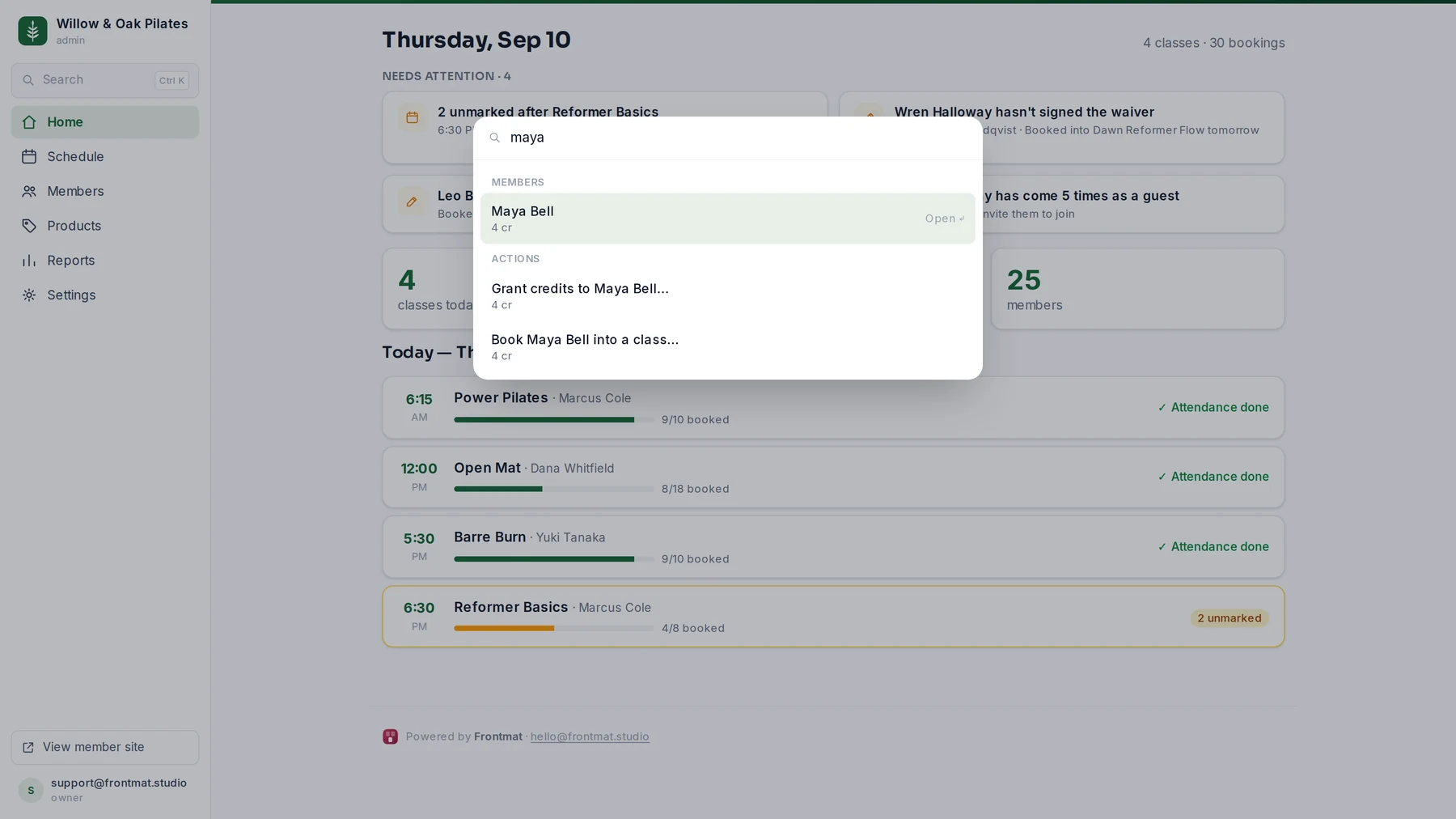
⌘K anywhere — a name away from any member, page, or action.
The desk fits your phone. Nothing scrolls sideways — we gate on it.
When we ship something new, it's yours the next morning. Not a line item, not an upgrade
tier, not a call with sales.
Fill your classes
Recurring schedules across timezones, floor plans, capacity, waitlists with claim
windows, and a schedule your members can filter by class, instructor, location, and open
spots. Everyone who asks about the studio lands in Leads, and three short emails over
ten days follow up in your words until they book.
Keep them coming back
Home tells you when a regular is coming less often, with a note ready to send. Referral
links with credits on both sides, win-back messages when someone stops, and milestone
celebrations, all written in your voice and sent from your studio's own address book.
Never a marketplace.
Get paid, honestly
Class packs, memberships, and drop-ins through Stripe, at Stripe's own rates. We add
nothing. Credits live on a real ledger: when one expires it actually expires, and your
member can see exactly why.
Run every location
Multi-location is included, not a per-site fee. Separate schedules, floor plans, and
timezones, with one member balance and one price.
Run the front desk
Check-ins, no-shows, late-cancel fees with a human waive queue, roster flags for
milestone classes, CSV import and export of everything you own.
Know your numbers
Revenue, fill rates by class and site, active members, failed payments with one-tap
retry, and the funnel from first interest to still coming at 90 days. The numbers you
actually check, not a dashboard thesis.
Each piece on its own page
Built for
Honest pricing
The pricing page is the pricing.
One flat price, every feature, every location. The only other cost you'll ever pay is
Stripe's standard card processing, and that goes to Stripe, not us.
12–24 mo contracts; $500 payment-data exit (reported, Mindbody)
From competitors' public pages and pricing reporting, July 2026; the lead follow-up row
from their pages on October 23, 2026. We'll correct anything they fix.
What we don't do (yet)
No consumer marketplace. On purpose, forever. Your members are yours. We will
never sell them someone else's classes.
No retail POS, payroll, or appointments-first scheduling. If those run your
business today, Mindbody may genuinely fit you better. We'd rather you know that now
than after a migration.
No AI front desk. Your members message your studio, not a bot wearing your logo.
Everyone promises free migration. Here's what ours actually looks like, day by day.
Day 0
Export & import
Send us your member export. Mindbody and Punchpass formats work as-is. We dry-run it and
show you exactly what will land before anything goes live: names, credits, memberships,
lifetime visit counts.
Day 1
Members land whole
Balances intact. Class history intact, so the member with 300 lifetime classes wears her
🔥 badge on day one. Nobody re-registers, nobody loses a pack, nobody types a card
number at the front desk.
Day 2
You teach class
Schedule live, spots bookable, waitlists on. You go back to the room. We watch the first
week with you ourselves, not from behind a ticket queue.
Yes. $99/month flat, every feature, every location. Card
processing is Stripe's published rate and goes to Stripe. We take no cut, no markup, and
no commission on anything your members buy from you.
What happens to my members' saved cards and packs?
Packs, credits, and memberships import with their balances and expiry terms. Saved cards
live with the payment processor. During migration your members reconnect a card on their
first purchase, and we tell you exactly who's done it so the front desk is never
surprised.
Is there a contract?
No. Month to month, cancel from your own settings page, full export of members, history,
and ledger any time, before, during, or after canceling.
Who builds and supports this?
A small team that answers its own support email. You will never explain your studio to a
queue. When something ships, every studio gets it the next morning.
Can I put the schedule on my own website?
Yes. Settings has one snippet to paste into Squarespace, Wix, WordPress, Shopify,
Webflow or GoDaddy. Your live schedule appears on your page in your colors, and on a
current browser people book right there: sign-in link, waiver, spot, payment, all inside
your site. Where a browser can't hold the session, the tap opens your Frontmat page and
brings them back. The schedule higher up this page is the demo studio's, embedded
exactly that way.
Do I need a separate tool to follow up with people who haven't booked?
No. Everyone who asks about your studio lands in Leads, whether they signed up on your
website, joined your pre-opening list, came as a member's guest or followed a referral.
Frontmat sends three short emails over ten days in your words, from your studio, and
stops the moment they book or buy. It is on by default and part of the $99. If you
already use an email tool, Connect hands it each new lead as it happens.
What if you're missing something I need?
Tell us. Spot booking, milestones, and multi-location all exist because studio owners
asked and we shipped, usually within the same season. And if what you need is a POS or
payroll, we'll say so plainly: we're not that, yet.
Start free and have your own studio running in about ten minutes, sample schedule and all.
No sales call, unless you'd like one. In that case you'll get a founder.