Sell a drop-in, a class pack, or a membership
A studio sells three things: a drop-in (one purchase, one class credit), a class pack (a set of credits, with an optional expiry), and a membership (monthly, with a number of classes a month or unlimited). Three products are enough to open.
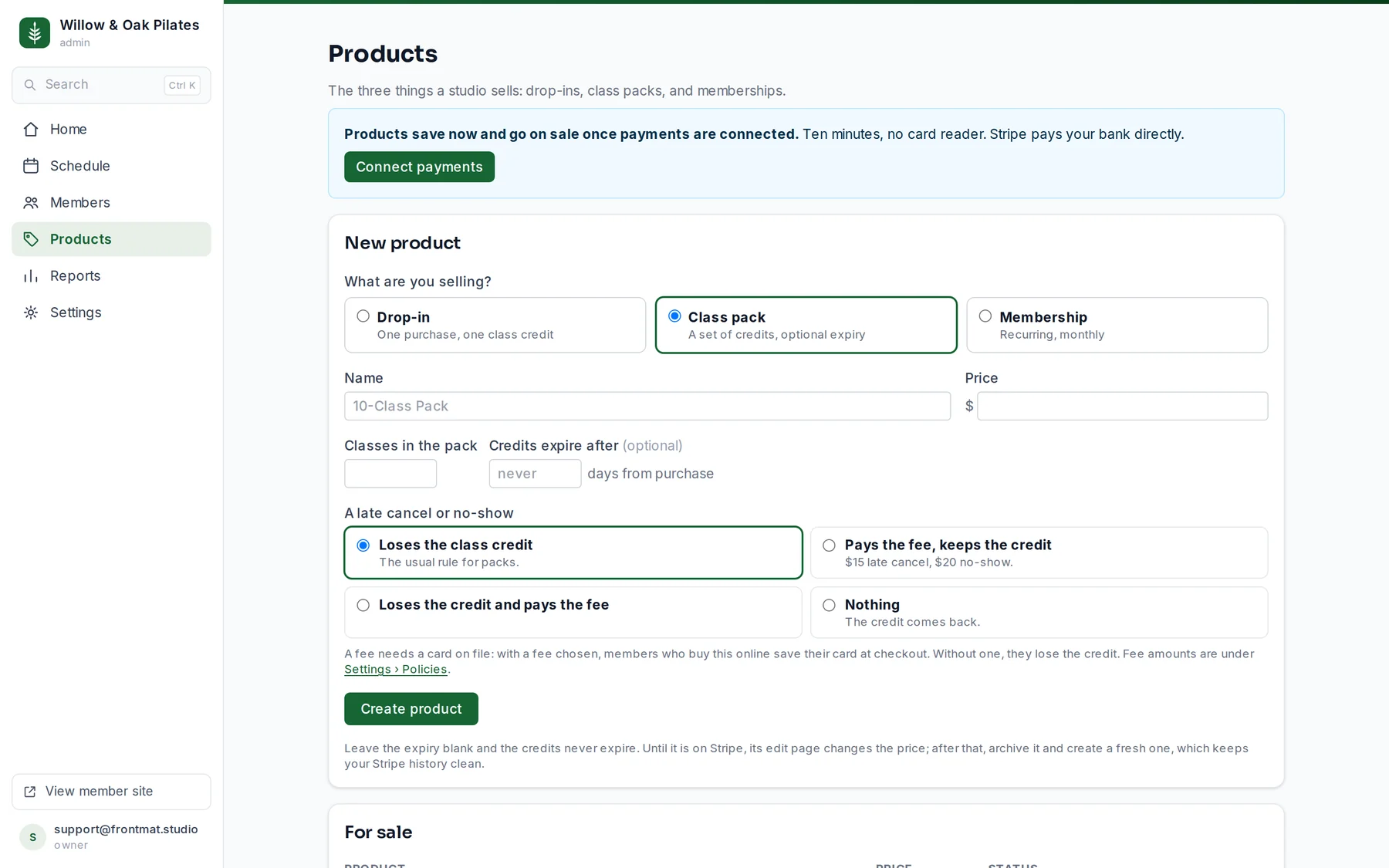
- Open Products. The New product form is at the top of the page.
- Choose what you are selling under What are you selling?, give it a Name members will recognize in the store, and a Price (for a membership, the price per month).
- For a pack, type Classes in the pack, and if the credits should expire, Credits expire after in days. Leave it blank and they never expire.
- For a membership, choose Unlimited or A number each month. Credits arrive with each monthly payment.
- Choose what A late cancel or no-show costs someone who booked with this product (see below).
- Click Create product. Once payments are on, the price syncs to your Stripe account when you save.
Before you open: a founding tier
A membership can bill on your opening day instead of when someone buys. Under Billing starts, choose On opening day. The member's card is saved now, nobody pays before that day, and the store tells them so before they pay. Moving the opening day under Settings › Studio moves every pending start with it.
Founding spots caps it. The store and your website show 37 of 100 left and close at zero. Size it to the room: an unlimited membership in a 30-person room is not 150 members.
Some states regulate pre-opening sales (New York, New Jersey, Pennsylvania, Massachusetts, Florida, Colorado, Maryland and Texas among them). Nothing is charged before your opening day, which is what most of those rules are about, but the rules are yours to check. Our state guides point at each one.
What a late cancel or no-show costs
The rule lives on the product the member booked with, so a pack and an unlimited membership can differ. For a pack or drop-in: Loses the class credit (the usual rule), Pays the fee, keeps the credit, Loses the credit and pays the fee, or Nothing. For an unlimited membership: Pays the fee or Nothing. A fee needs a card on file, so a pack with a fee saves the member's card at checkout; without a card, they lose the credit instead. The fee amounts are under Settings › Policies.
Changing a price
Until a product is on Stripe, its edit page changes the price. After that, archive it and create a fresh one, which keeps your Stripe history clean and leaves everyone who already bought exactly what they were sold. Classes and expiry on a pack apply to packs bought from now on.
Archiving
Open the product and click Archive. It leaves the store; history and Stripe records stay, and members who bought it keep what they have. Restore under Archived puts it back on sale.
Good to know
- The drop-in is also the price of a class for someone with no credits, once per credit the class costs. If you sell no drop-in, those people buy a pack instead.
- A pack bought before you open counts its days from your opening day, not the purchase, so nobody loses the weeks until you open. Bought after, it counts from the purchase.
- A membership is a monthly Stripe subscription. Members manage their card and cancel themselves under Account › Manage in the app; a cancellation runs to the end of the paid month.
- Refunding a pack or drop-in: open the member's record, and under their recent purchases click Refund. It takes the credits back and refunds the Stripe charge in full, and only works while the credits are unspent.