Reports and exports
Reports is one page of this month's numbers, plus the list of fees that failed to charge. Exports, linked from its top corner, downloads everything the studio holds as CSV.
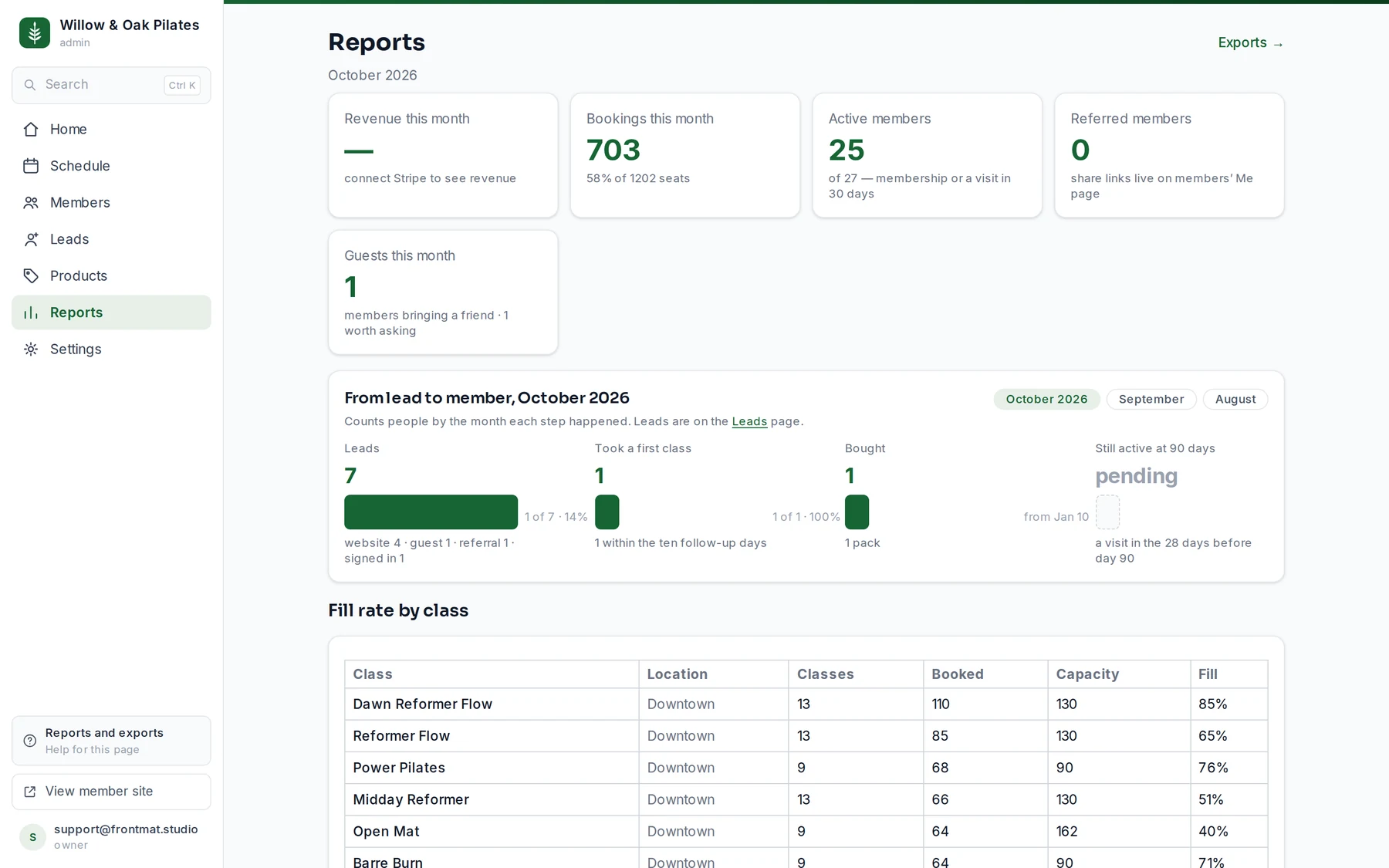
The numbers
- Revenue this month: what Stripe took for you this month, after refunds. Owners and admins see it, and only once Stripe is connected.
- Bookings this month, and what share of the month's seats that is.
- Active members: members with a membership, or a visit in the last 30 days, out of all members. Staff are not counted. It is the same count as the Active 30d filter on Members.
- Referred members, and how many took a first class.
- Guests this month, how many became members, and how many have come often enough to be worth asking.
- From lead to member: one group of people followed step by step, Since you opened or the people who arrived in one of the last three months. How many showed interest (and from where), how many bought or booked, how many came to a class (and how many have not come yet), and how many were still coming 90 days after their first purchase. Each step is a share of the one before. A step nobody could have reached yet says when it can.
- Fill rate by class: for each class name, how many ran, how many were booked, the capacity, and the fill percentage.
- Failed fee captures: a late-cancel or no-show fee whose card charge failed, with Stripe's reason, and a Retry and a Waive button each.
In a studio's first weeks, When your numbers fill in sits above them: the day Active members settles (four weeks after the first class, the same day Members names), your first whole month to read, and the first 90-day answer. It goes once the last of those days has passed.
Before you open
The page starts with Before you open: how many of the opening week's spots are booked, how many founding spots are sold, how many emails are waiting for booking to open, and how many people saved a founding spot. Month tabs run through your opening month so you can look at January while it is still October.
Exports
Click Exports → (owners and admins). Six files, each with a Download CSV link: Members (names, emails, roles, credits, waiver status), Leads (where each came from, how far they got, the follow-up), Bookings (every booking with class, spot and status), Credit ledger (grants, burns and reasons), Fees (assessed, captured and waived), and Waitlists (entries with position and outcome). They download on demand, with no waiting, and they are yours at any time, including after you leave.