The emails and texts members and leads get
Every email goes out in your studio's name and color, with your contact email at the foot. Booking and waitlist messages are fixed; the lifecycle messages, from a lead's first email to a win-back, are yours to switch off or rewrite.
Always sent
- Booked: the confirmation, with a calendar invite and the address.
- Canceled: when the member cancels, with what happened to their credit and any fee.
- Class canceled: when you cancel a class, with the credit back.
- The waitlist: You're in when auto-booked, A spot opened: claim it, Your claim window closed, and a note when a spot opened but they need credits.
In your voice
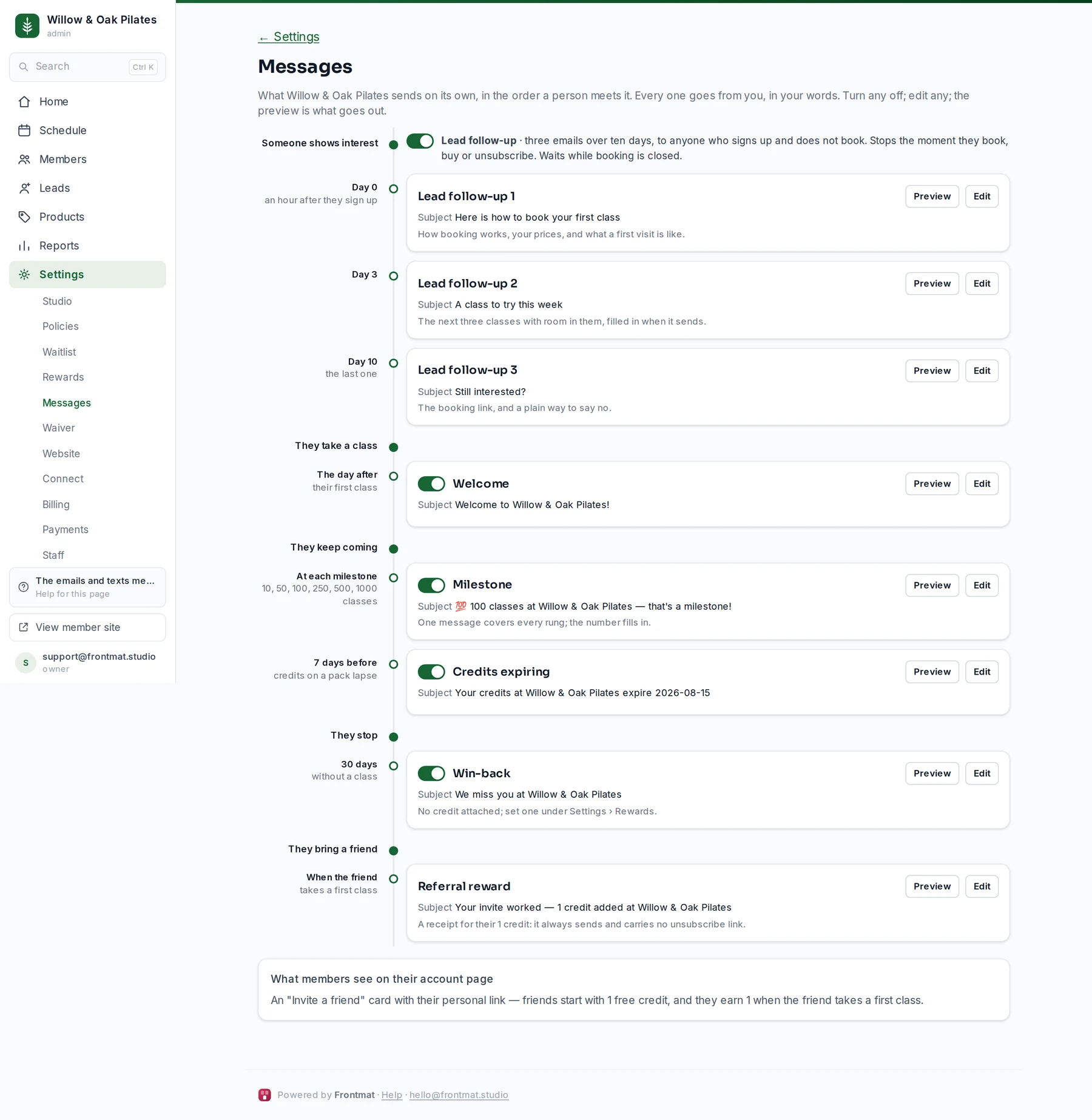
Settings › Messages lays out everything your studio sends on its own, in the order a person meets it: Someone shows interest (the three lead follow-up emails), They take a class (Welcome), They keep coming (Milestone, Credits expiring), They stop (Win-back), and They bring a friend (Referral reward). Each card says when it sends and shows its subject, and how many have gone out so far (or, before the first, what will send it).
- The switch beside a card turns that message off or on (owners and admins). The three lead emails share one Lead follow-up switch. The referral reward follows the referral program under Settings › Rewards.
- Preview shows the email as it goes out, with your current settings.
- Edit opens the subject and the body. The Insert buttons add the studio name, the link, a first name, the credits and the rest. Reset to default brings the standard text back. The button, the unsubscribe line and your address are always added, so an edit cannot break anything.
- Click Save message. A changed message says customized; one switched off says off.
Texts
Texts go only with the booking and waitlist messages, and only to a member who added a mobile number and ticked the consent box under Account › Notifications in the app (also offered right after a booking on your website). A new opt-in gets one confirmation text; STOP ends them. The lifecycle messages never text. Push notifications are per device, turned on from the same page.
Unsubscribing
Every lifecycle message except the referral reward, which is a receipt, carries an unsubscribe link. A member who uses it stops getting updates and still gets every booking and waitlist message. A lead who uses it gets nothing more from your studio. Every email your studio sends a person shows on their timeline.